
| 일 | 월 | 화 | 수 | 목 | 금 | 토 |
|---|---|---|---|---|---|---|
| 1 | 2 | 3 | 4 | 5 | 6 | |
| 7 | 8 | 9 | 10 | 11 | 12 | 13 |
| 14 | 15 | 16 | 17 | 18 | 19 | 20 |
| 21 | 22 | 23 | 24 | 25 | 26 | 27 |
| 28 | 29 | 30 |
- MYSQL
- SQL
- 리텐션
- funnel
- row_number
- 누적합
- dense_rank
- leetcode
- advent of sql
- 데이터분석
- LEFTJOIN
- regexp
- 서브쿼리
- python
- 그로스해킹
- 순위함수
- 데이터리안
- 윈도우함수
- 프로그래머스
- 취준
- 윈도우 함수
- pandas
- Retention
- 린분석
- rank
- 신입 데이터분석가
- Datarian
- 퍼널분석
- 독서
- SolveSQL
- Today
- Total
데이터 분석
[Pandas] DataFrame.unstack()/div() 활용 본문
pd.DataFrame.unstack()
'neighbourhood' 값과 'neighbourhood_group' 값에 따른 'price' 컬럼의 평균을 계산한 데이터프레임을 가정하자.
df.groupby(['neighbourhood', 'neighbourhood_group'])[['price']].mean()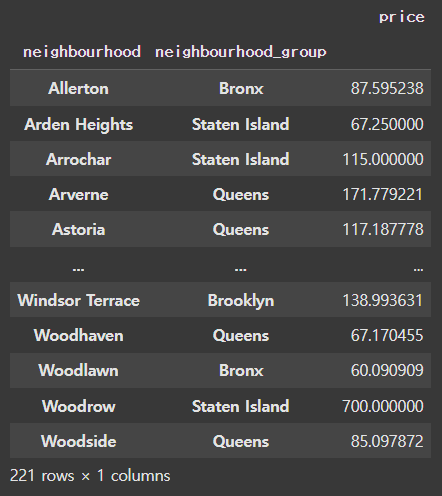
df.unstack()
● 데이터프레임이 위와 같이 멀티인덱스를 사용할 때, 하위 레벨 인덱스를 컬럼으로 옮겨 데이터를 재구조화 가능
● 기본적으로 가장 하위 레벨(-1)을 컬럼으로 이동하며, 다른 레벨을 지정하려면 level 파라미터를 사용 가능
df.groupby(['neighbourhood', 'neighbourhood_group'])[['price']].mean().unstack()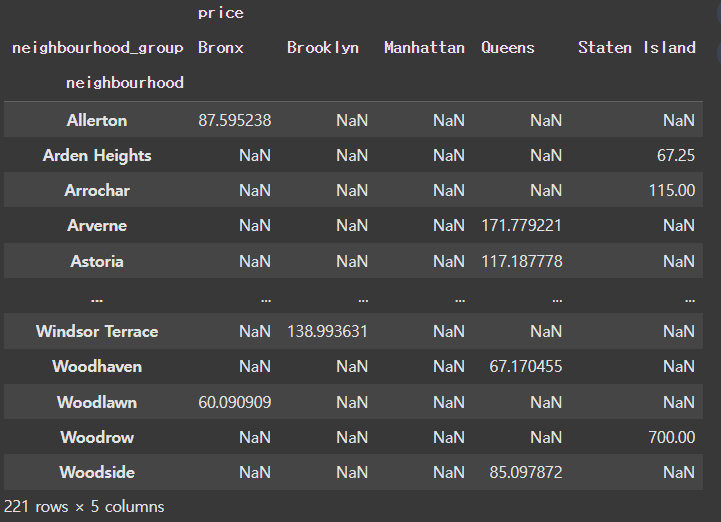
'neighbourhood_group' 값이 컬럼으로 이동한 것을 확인할 수 있으며 shape 또한 (221, 1)에서 (221, 5)으로 변환됨을 알 수 있다.
☞ 또한, 추가적인 기능으로 NaN 값을 채우기 위해 fill_value 파라미터를 사용하거나 fillna() 메소드를 사용할 수 있다.
df.groupby(['neighbourhood', 'neighbourhood_group'])[['price']].mean().unstack(fill_value=-999)
# df.groupby(['neighbourhood','neighbourhood_group']).price.mean().unstack().fillna(-999)
https://pandas.pydata.org/docs/reference/api/pandas.DataFrame.unstack.html#pandas.DataFrame.unstack
pandas.DataFrame.unstack — pandas 2.2.3 documentation
Level(s) of index to unstack, can pass level name.
pandas.pydata.org
pd.DataFrame.div()
이번엔 'neighbourhood_group' 값에 따른 'room_type' 컬럼의 숫자를 구해보자.
data = df.groupby(['neighbourhood_group', 'room_type']).size().unstack()
data
위의 데이터프레임에서 'neighbourhood_group' 값을 기준으로 각 값의 비율을 구하려면 어떻게 해야할까?
df.div(other, axis=...)
● other로 지정된 값(데이터프레임, 시리즈, 스칼라)으로 데이터프레임의 각 요소를 나누는 역할을 수행
● 행 단위 연산 : axis = 0 or axis = 'index' / 열 단위 연산 : axis = 1 or axis = 'columns'
data = df.groupby(['neighbourhood_group', 'room_type']).size().unstack()
data.div(data.sum(axis=1), axis='index')
https://pandas.pydata.org/docs/reference/api/pandas.DataFrame.div.html#pandas.DataFrame.div
pandas.DataFrame.div — pandas 2.2.3 documentation
Fill existing missing (NaN) values, and any new element needed for successful DataFrame alignment, with this value before computation. If data in both corresponding DataFrame locations is missing the result will be missing.
pandas.pydata.org
마무리
오늘은 데이터프레임의 멀티인덱스를 다룰 때 유용한 .unstack() 메서드와, 데이터프레임의 요소를 다른 값으로 나누어 비율을 계산하는 .div() 메서드의 활용 방법을 정리해보았다.
이 두 메소드는 데이터 구조를 재정렬하거나 비율 계산 같은 분석에 필수적인 작업을 간결하게 수행할 수 있어, 앞으로 익혀두면 좋을 것 같다는 생각이 들었다.
'Python > Pandas' 카테고리의 다른 글
| [Pandas] 날짜 데이터 다루기 (2) | 2024.12.17 |
|---|---|
| [Pandas] datetime 컬럼 가공 | 잘못된 연도 값 조정하기 (2) | 2024.12.14 |
| [Pandas] Series.map() & DataFrame.apply() 활용 (0) | 2024.12.13 |
| [Pandas] Filtering & Sorting (1) | 2024.12.07 |
| [Pandas] 문자열 컬럼 가공하기 | 달러 기호 제거와 숫자 변환 (0) | 2024.12.06 |


